The Problem
Every sale on paper. No inventory visibility. No way to know what sold last week.
Why Custom
Every tool she tried bent the business to fit the software. She needed the opposite.
Off-the-shelf options exist — but none could be shaped to her exact product hierarchy, stock logic, or the specific way Elicit Furnishing processes sales. Something built from scratch, around her business, was the only path.
Process
She explained the problem. I built. We iterated from there.
She walked me through how her business works — what she sells, how she restocks, what she needs to know at the end of each week. I built from that. Once it was live and she was using it in her actual business, real edge cases surfaced that no spec could have anticipated. We worked through them one at a time.
Revisions
Real use revealed what no spec could.
- Category structure — Certain groups (like Medium Centers) needed splitting from their parent category entirely. The inventory view was restructured into collapsible sections showing per-category unit counts; the flat list restores when filtering to a specific category.
- Restocking logic — Two modes emerged from a real issue: Add to All applies the same quantity to each model individually; Distribute Total splits a combined shipment evenly across the category. She needed both depending on how stock arrived.
- Generic product sales — When a sale doesn't map to a specific model, the app auto-deducts from the oldest stock entry in that category. An edge case she surfaced in use, turned into a first-class feature.
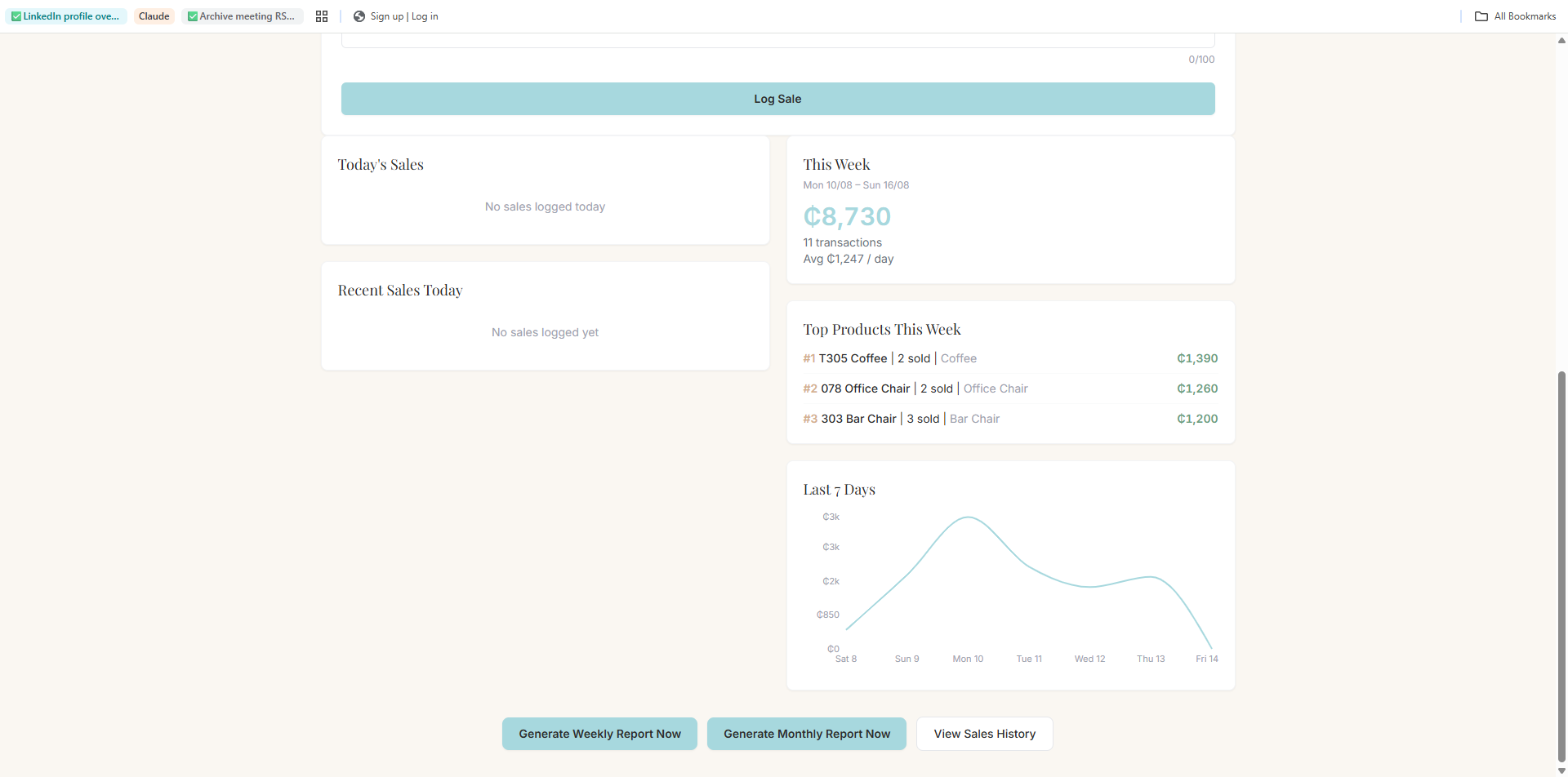
- Dashboard analytics — Preset and custom date range filtering driving a revenue / orders / daily-average stat block and a top-10 best sellers list — all computed client-side from already-loaded sales data. She needed to see performance over time, not just a running total.
- Low-stock threshold — Went through three iterations: a global setting, then a Settings modal field, then per-product values editable inline on each inventory row. Persisted to Supabase and mirrored in localStorage for the demo build. Sort options (name, stock, price) and a low-stock-only filter toggle added alongside.
What Was Built
Five systems. One tab. Zero training required.
- Sales logging with searchable product picker across all 74 items — price auto-fills on selection
- Revenue dashboard with date range analysis — monthly, yearly, custom ranges, best sellers panel, and daily averages (Recharts)
- Automated weekly and monthly email reports via Resend, triggered on a Vercel cron schedule — no manual export, no reminder needed
- Inventory tracking across 12 product categories with collapsible category groups, sort options, and a configurable low-stock threshold synced to Supabase
Under the Hood
PostgreSQL, edge functions, and automated email — not just a front-end.
Database
Supabase — PostgreSQL
Three tables with row-level security so the app works without user auth. Five SQL migrations shipped post-launch as Kerzy's needs evolved — adding stock, variants, category splits.
products  · sales  · settings
stock_quantity  · variant
is_group  · low_stock_threshold
Email Automation
Resend + Vercel Cron
Weekly and monthly reports fire on a cron schedule — no manual export, no reminder. Vercel edge functions act as a proxy so the API key never touches the client.
Mon 08:00 UTC → weekly report
1st of month  → monthly report
POST /api/send-report → Resend
Data Layer
Custom Supabase Client
All DB logic lives in a single db.js module — addSale, deleteSale, restockProduct, setStock, getSalesByDateRange. Stock auto-deducts silently on every sale so logging is never blocked.
addSale()  · deleteSale()
restockProduct()  · setStock()
getSalesByDateRange()
Analytics
Recharts — Client-Side
Revenue, order count, daily averages, and best-seller rankings are all computed client-side from already-loaded sales data. No extra API calls for filters or date ranges.
Weekly bar chart
Top-10 best sellers
Custom date range filter
Auth
Password Gate
Lightweight password gate wraps the entire app — no full auth system needed for a single-operator tool. Stored in localStorage; password lives as a Vercel env var.
VITE_APP_PASSWORD → Vercel
localStorage → session persist
PasswordGate.jsx → full wrap
Deployment
Vercel — React + Vite
Frontend on Vercel with serverless edge functions in /api for email and cron. Env vars for Supabase keys, Resend key, and app password kept off the client entirely.
React 18 + Vite + Tailwind
/api/send-report.js  (edge fn)
/api/weekly-report.js (cron)
Outcome
Live. Used every day by the client it was built for.
- Real client, real data — Elicit Furnishing's actual inventory and sales, no demo mode
- Designed for a non-technical user — zero training, no manual, learnable by looking at it
- Full-stack solo delivery — design, frontend, backend, email automation, and deployment
Client
“He completely exceeded my expectations. Not only did he create exactly what I requested, but he also went above and beyond by incorporating additional features that made the ledger even more useful — particularly when it came to analysing my business data.
Every single request was incorporated, often within just a few hours. He took note of everything and made sure nothing was overlooked, so I never had to worry about reminding him about something I had previously mentioned.
Most importantly, Stephen brought a huge sense of relief to what had previously been one of my biggest bookkeeping struggles. I now have a system that is not only tailored to my business but also makes it much easier to keep track of and understand my data.”
— Kersten Brefo, CEO — Elicit Furnishing